
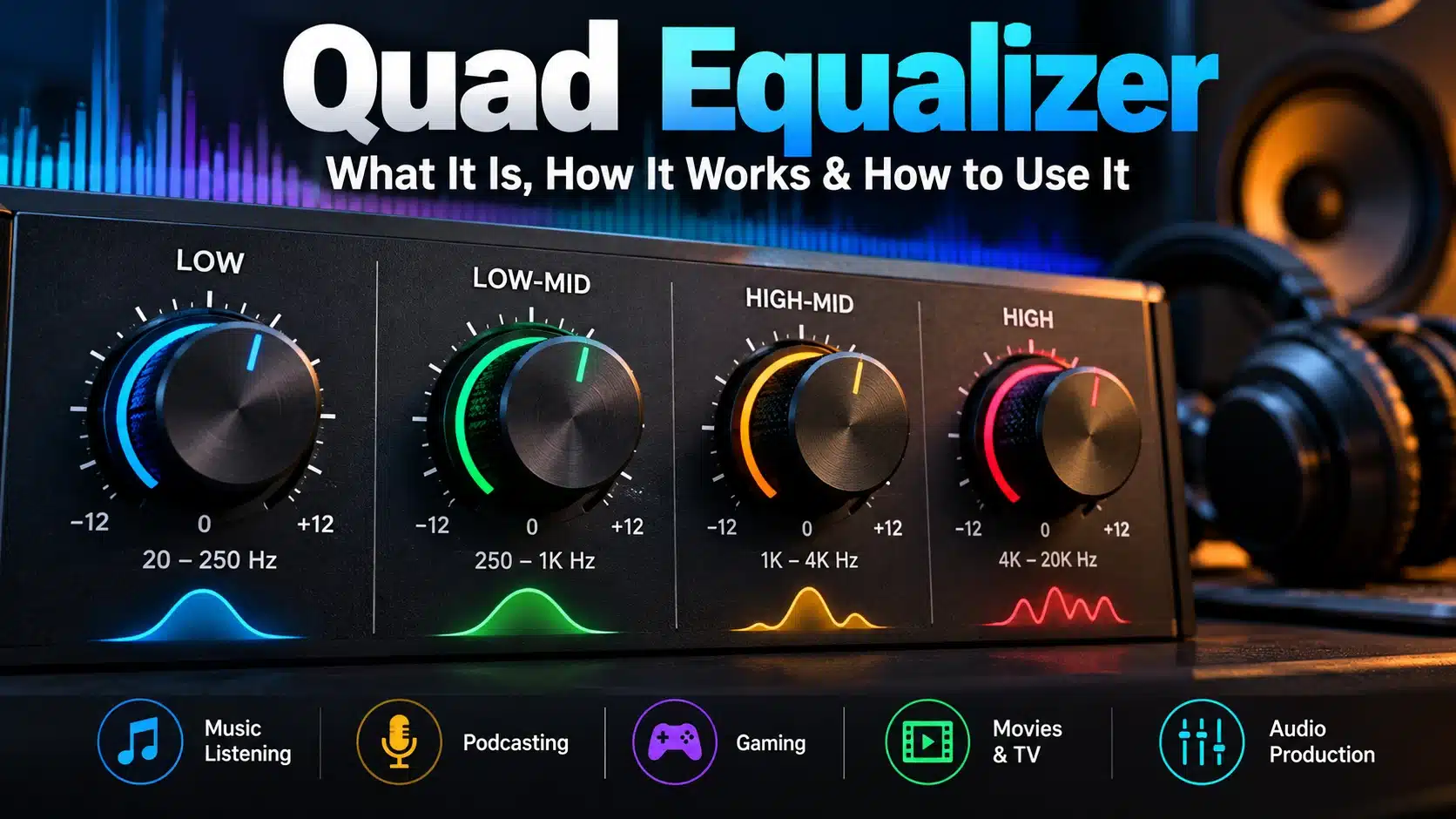

A quad equalizer is an equalization system built around four adjustable sections, although the exact meaning of “quad” depends on the context. In audio, it commonly refers to a four-band equalizer that lets you adjust different parts of the frequency spectrum. In other technical applications, it can describe a device or system that processes four separate signal channels.
This distinction matters because there is no single universal design called a quad equalizer. A four-band audio equalizer and a four-channel signal equalizer perform different jobs even though both may be described using the word “quad.”
For music, headphones, speakers, podcasts and other audio applications, a four-band EQ provides a straightforward way to shape bass, midrange and treble. In electronics and communications, equalization can instead be used to compensate for signal loss or distortion during transmission.
This guide explains what a quad equalizer is, how four-band equalization works, what the four controls do, how to adjust them, and how a quad equalizer compares with graphic and parametric EQ systems.
What Is a Quad Equalizer?
A quad equalizer generally describes an equalization system involving four adjustable bands or four independent signal paths.
When the term is used in audio, it most commonly refers to a four-band EQ. Instead of providing dozens of frequency controls, the equalizer divides the audible spectrum into four broader sections.
A typical four-band audio equalizer might provide controls for:
- Low frequencies
- Low-mid frequencies
- High-mid frequencies
- High frequencies
The exact frequency ranges aren’t universal. One EQ might place its controls at different frequencies from another.
The purpose is to let you change the tonal balance of an audio signal without requiring the more complicated controls found on a professional parametric equalizer.
For example, you might reduce low frequencies if a recording sounds too boomy, make a small midrange adjustment if vocals lack clarity, or reduce excessive high-frequency energy if a track sounds harsh.
What Does “Quad” Mean?
The word quad means four, but it does not always mean four frequency bands.
This is one of the most important things to understand about the term.
Four-band equalizer
A four-band equalizer has four adjustable frequency sections.
For example:
| Band | General role |
|---|---|
| Low | Bass and low-end energy |
| Low-mid | Warmth and body |
| High-mid | Presence and clarity |
| High | Treble and detail |
The actual crossover points depend on the design of the EQ.
Four-channel equalizer
In another context, “quad” can refer to four separate signal channels.
A four-channel equalizer could therefore process four independent signals rather than divide one signal into four frequency bands.
These are very different concepts.
Quadraphonic audio
The word quad can also appear in discussions about quadraphonic or four-channel audio.
Here, the four refers to the number of audio channels rather than four frequency bands.
Therefore, when you see a product described as a “quad equalizer,” check its specifications to determine exactly what the manufacturer means.
How Does a Quad Equalizer Work?
A four-band audio equalizer works by dividing the audio spectrum into several frequency ranges and allowing you to change the relative level of each range.
Increasing a band boosts the frequencies covered by that band.
Reducing a band cuts those frequencies.
The result is a change in the tonal character of the audio.
For example, if a recording sounds too bass-heavy, reducing the low-frequency band can create a more balanced sound. If speech sounds dull, a modest adjustment in an appropriate mid or high-frequency region may improve clarity.
The controls don’t all affect the same frequencies. Each band is designed to influence a particular portion of the spectrum.
What Do the Four Bands Control?
There isn’t a universal four-band layout, but many audio equalizers divide their controls broadly across the spectrum.
Low frequencies
The low-frequency section controls the lower end of the audio spectrum.
It can influence:
- Bass instruments
- Kick drums
- Low-end effects
- The weight or fullness of recordings
Too much low-frequency energy can make sound muddy or boomy.
Too little can make music sound thin.
Low-mid frequencies
The low-midrange contributes significantly to the body and warmth of many sounds.
This region can affect:
- Vocals
- Guitars
- Piano
- Drums
- General fullness
Excessive energy here can make several instruments compete for the same space.
High-mid frequencies
High-mid frequencies contribute to presence, definition and intelligibility.
This range can influence how clearly vocals and instruments stand out.
Too much adjustment in this area, however, can make a recording sound aggressive or harsh.
High frequencies
The high-frequency section controls the upper end of the spectrum.
It can influence:
- Treble
- Percussion detail
- Brightness
- Airiness
- High-frequency clarity
Excessive high-frequency boosting can make audio sound sharp or tiring.
What Is a Quad Equalizer Used For?
A four-band equalizer can be useful in many different audio situations.
Music listening
A quad EQ can help listeners adjust the tonal balance of headphones, speakers or other playback systems.
For example, someone who prefers more bass may make a modest low-frequency adjustment rather than changing the entire sound profile.
Music production
Producers can use EQ to shape individual tracks and help instruments fit together.
A four-band EQ is particularly useful for broad tonal adjustments when detailed frequency-by-frequency control isn’t necessary.
Podcasting
Equalization can help improve the perceived clarity of spoken audio.
A recording with excessive low-frequency rumble or an unbalanced midrange may benefit from careful adjustment.
Voice recording
A four-band EQ can help shape the tonal character of a recorded voice.
However, EQ shouldn’t be expected to fix every recording problem. Microphone placement, room acoustics and recording quality remain important.
Movies and television
EQ can also be useful for adjusting dialogue, music and effects during playback.
The ideal setting depends on the recording, speakers, headphones and listening environment.
Gaming
Gamers may use EQ to change the balance between dialogue, effects and other sounds.
There is no universal gaming EQ because different games and headphones have different characteristics.
How to Use a Quad Equalizer
The best approach is usually to make small changes rather than dramatically changing every band.
Start with a neutral setting
Begin with the EQ controls at their default or flat position.
This gives you a reference point.
Identify the problem first
Don’t adjust a band simply because it exists.
Listen for a specific issue.
For example:
- Too much bass
- Weak bass
- Muddy sound
- Unclear vocals
- Excessive brightness
- Harsh treble
Once you identify the problem, make a targeted adjustment.
Make small changes
A small adjustment can have a noticeable effect.
Large boosts and cuts can make audio sound unnatural and may create unwanted distortion or reduce available headroom.
Change one area at a time
If you change all four bands simultaneously, it becomes difficult to determine which adjustment actually helped.
Make one change, listen, and then decide whether another adjustment is necessary.
Compare with the original
After adjusting the EQ, switch it off and compare the original sound with the modified version.
This prevents you from assuming that a louder or brighter sound is automatically a better sound.
What Are Good Quad Equalizer Settings?
There is no single best quad equalizer setting.
The correct settings depend on:
- The recording
- Headphones or speakers
- Room acoustics
- Listening volume
- Personal preference
- The type of content
A setting that sounds excellent on one pair of headphones may sound poor on another.
Instead of copying a fixed preset, start with a neutral setting and make small adjustments based on what you actually hear.
For stronger bass
A modest low-frequency increase may add weight, but too much can make the recording sound muddy.
For clearer vocals
If vocals sound buried, a carefully chosen midrange adjustment may improve their presence.
For less harshness
If high frequencies sound aggressive, reducing the appropriate upper-frequency band may produce a smoother result.
For more brightness
A small high-frequency adjustment can add perceived detail, but excessive boosting may make sibilance or harshness more noticeable.
The important principle is adjust for balance rather than simply boosting everything you want to hear more clearly.
Quad Equalizer vs Four-Band Equalizer
In an audio context, these terms can sometimes refer to essentially the same thing.
A four-band equalizer specifically describes an EQ with four frequency bands.
A quad equalizer is a broader term and can potentially refer to four bands or four channels depending on the product.
If you’re researching an audio product, always check its specifications.
The product description should tell you whether the four sections represent:
- Frequency bands
- Audio channels
- Signal paths
- Another four-part configuration
Quad Equalizer vs Graphic Equalizer
A graphic equalizer normally provides multiple fixed frequency bands, each with its own level control.
A four-band EQ offers fewer controls and is therefore generally simpler.
| Feature | Quad/Four-Band EQ | Graphic EQ |
|---|---|---|
| Number of bands | Four | Usually more |
| Ease of use | Simpler | More detailed |
| Frequency control | Broader | More granular |
| Best for | Broad tonal shaping | More precise adjustments |
| Learning curve | Lower | Moderate |
Neither is automatically better.
A four-band EQ may be preferable when you want quick, broad adjustments, while a graphic EQ can be more useful when you need greater control over specific frequency ranges.
Quad Equalizer vs Parametric Equalizer
A parametric equalizer normally provides much more control than a basic four-band EQ.
Depending on the design, a parametric EQ may let you adjust:
- Frequency
- Gain
- Bandwidth
- Q factor
This makes it possible to target a narrow frequency range or make highly controlled adjustments.
A four-band EQ is simpler.
Choose a four-band EQ when:
- You want straightforward controls
- You mainly need broad tonal adjustments
- You’re new to equalization
- You don’t need precise frequency targeting
Choose a parametric EQ when:
- You need detailed control
- You’re mixing or mastering audio
- You need to target specific frequencies
- You understand frequency, gain and bandwidth adjustments
Quad Equalizer vs Four-Channel Equalizer
These terms should not automatically be treated as synonyms.
A four-band EQ divides one audio signal into four frequency ranges for adjustment.
A four-channel equalizer can process four separate signal channels.
For example, a multi-channel system might have independent processing for four different audio paths.
Therefore, if a specification says “quad equalizer,” look for additional information explaining whether it means four bands or four channels.
Quad Equalizer in Electronics and Signal Processing
The term equalizer is not limited to music.
In electronics and communications, equalization can be used to compensate for signal degradation that occurs when signals travel through a transmission path.
A signal can experience attenuation, frequency-dependent loss or other forms of distortion.
An equalizer can compensate for some of these effects and help restore signal integrity.
In this context, “quad” may describe a device with four channels or four independent equalization paths rather than four audio frequency bands.
This is why the surrounding technical context matters when researching the phrase quad equalizer.
Common Quad Equalizer Mistakes
Boosting every band
Boosting all four bands doesn’t necessarily improve the sound.
It may simply increase the overall level while preserving much of the original tonal balance.
Using extreme settings
Large boosts and cuts can introduce unnatural tonal changes.
Start small.
Ignoring the room
Speakers interact with the room around them.
A room with strong low-frequency resonance can make bass appear excessive even when the original recording is balanced.
Using the same EQ for every recording
Different recordings have different tonal characteristics.
One setting won’t necessarily work equally well for music, podcasts, films and games.
Changing too many controls at once
If all four bands are adjusted simultaneously, it becomes difficult to understand what each change did.
Confusing volume with EQ
Increasing a frequency band is not the same as simply turning up the volume.
EQ changes the balance between frequency ranges.
Can a Quad Equalizer Improve Sound Quality?
It can improve the perceived tonal balance of audio, but an equalizer isn’t a universal repair tool.
EQ can help with issues such as excessive bass, weak presence or excessive brightness.
However, it cannot completely repair problems such as:
- Severe clipping
- Major distortion
- Poor microphone placement
- Missing audio information
- Extremely low-quality recordings
Good equalization works best alongside good recording, mixing and playback equipment.
Is a Quad Equalizer Good for Beginners?
A four-band equalizer can be a good starting point for someone learning the basics of EQ.
It provides enough control to demonstrate how different frequency ranges affect sound without presenting the large number of controls found on some professional EQ plugins.
A simple learning method is:
- Start with a flat setting.
- Listen to the original audio.
- Identify one problem.
- Adjust one band slightly.
- Listen again.
- Compare with the original.
- Keep the adjustment only if it genuinely improves the result.
This approach teaches you to use EQ deliberately instead of relying on random presets.
How to Choose a Quad Equalizer
If you’re considering a four-band equalizer, look beyond the word “quad.”
Check the frequency ranges
Find out which frequencies each band actually controls.
Check the adjustment range
Look at how much each band can be boosted or cut.
Check whether frequencies are fixed
Some four-band systems use fixed frequency points, while others provide additional adjustment.
Consider hardware or software
A hardware EQ may be useful for physical audio systems, while software EQ can provide flexible control inside a computer or mobile device.
Check compatibility
Make sure the EQ works with your equipment, operating system, audio software or playback device.
Consider the controls
A simple interface may be preferable if you only need broad tonal adjustments.
Frequently Asked Questions About Quad Equalizers
What is a quad equalizer?
A quad equalizer is an equalization system involving four adjustable sections or channels. In audio, it commonly refers to a four-band equalizer.
Is a quad equalizer the same as a four-band EQ?
Not always. In audio, the terms may describe the same type of system, but “quad” can also refer to four independent channels.
What do the four bands on an EQ control?
A typical four-band EQ controls broad areas of the frequency spectrum, such as low, low-mid, high-mid and high frequencies. The exact ranges depend on the design.
What is the best quad equalizer setting?
There is no universal best setting. The right adjustment depends on the recording, playback equipment, room and personal preference.
Is a quad equalizer good for music?
Yes. A four-band EQ can be used for music listening, production, mixing and general tonal adjustment.
Is a quad equalizer better than a graphic EQ?
Not necessarily. A four-band EQ is simpler, while a graphic EQ generally provides more frequency bands and more detailed control.
Is a quad equalizer better than a parametric EQ?
A parametric EQ provides more precise control, while a four-band EQ is easier to use for broad adjustments.
Can a quad equalizer be used for vocals?
Yes. It can be used to shape the tonal balance of vocals and improve their perceived clarity.
Can a quad equalizer be used for gaming?
Yes. EQ can change the balance of game audio, although the ideal settings depend on the game, headphones or speakers and personal preference.
Does a quad equalizer increase volume?
An EQ primarily changes the relative level of different frequency ranges. Boosting frequencies can increase the overall signal level, but EQ is not primarily a volume control.
Does “quad” always mean four frequency bands?
No. In some technical contexts, “quad” can mean four channels or four independent signal paths. Always check the product’s specifications.
Final Thoughts
A quad equalizer is a flexible term that most commonly describes a four-band audio equalizer but can also refer to a four-channel or multi-path equalization system in other technical contexts.
For audio applications, a four-band EQ provides a simple way to adjust broad areas of the frequency spectrum, including bass, low-midrange, high-midrange and treble. It can be useful for music, podcasts, vocals, movies, gaming and general listening.
The key to getting good results is not to search for one “perfect” setting. Start with a neutral configuration, identify a specific problem, make a small adjustment and compare the result with the original.
If you’re researching a product described as a quad equalizer, also check whether “quad” refers to four frequency bands or four independent channels. That distinction can completely change what the device is designed to do.
A well-used equalizer should improve balance and clarity—not simply make every frequency louder.